
Perfmatters – Lightweight WordPress Performance Plugin (official) Lifetime
Features
We developed the Perfmatters plugin with simplicity in mind. We use all of these optimizations on our own sites and are excited to provide an easy way for you to now have them too! No messing around with code or your functions.php file. Performance optimizations shouldn’t have to be complicated and so everything can be enabled/disabled with a single click.
The main way this plugin helps speed up your site is by disabling scripts that might not be used on your site. For example, by default emojis load on every single page of your site. If you don’t use them, this is simply slowing it down. By disabling it, the script no longer loads and so it reduces your overall number of HTTP requests and your page size.
Another helpful feature is our database optimization. Over time things like revisions, auto-drafts, spam comments, and transients start to fill up your database and before you know it, it’s impacting the performance of your site. With Perfmatters you can easily clean all of these up and even put limits in place to prevent it from happening again. This ensures a fast and snappy database.
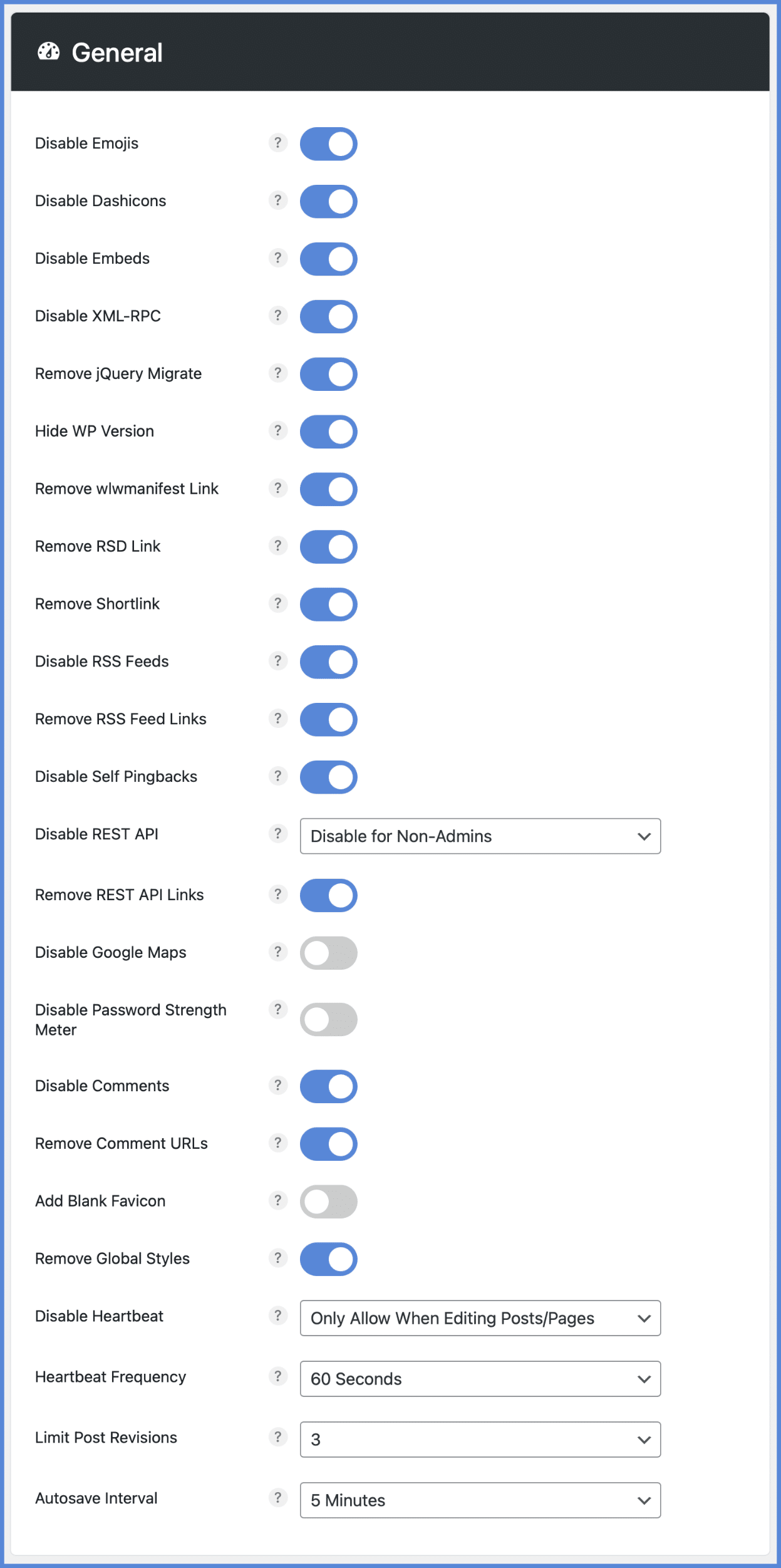
Quick-toggle options#
Many of the Perfmatter’s options can be applied by simply toggling them on. Here’s a quick look at a few we recommend utilizing:
Disable emojis, embeds, dashicons#
Disable unnecessary scripts and assets you might not be using on your site, such as emojis, embeds, dashicons, etc.
Disable or limit post revisions#
Disable or limit the number of post revisions that WordPress stores to keep your database from growing out of control.
Change autosave interval#
Keep fewer auto-drafts by changing your autosave interval. It also decreases the annoying “there is a more recent version” warning.
Disable and tweak Heartbeat API#
Heartbeat can cause high CPU usage and a crazy amount of AJAX calls. You can disable Heartbeat and also change the frequency.
Disable comments and URLs#
No blog? Disable comments sitewide to reduce spam, or remove author comment links to stop people from just trying to get a backlink.
Disable Google maps#
Google Maps can wreak havoc on your site’s performance. You can disable Google Maps selectively, and only load it where you need it.
Disable WooCommerce cart fragments (AJAX)#
The wc-ajax=get_refreshed_fragments request can cause huge delays on WooCommerce sites. Disable cart fragments on your site.
Grab a coffee and check out all the other quick toggle options you can choose from:



Reviews
There are no reviews yet.